Development of a Paper Summary Service Implemented with AWS Serverless


Through a three-week collaborative project conducted at the NIPA AWS Developer Bootcamp, we developed a medical paper summarization service.
In this article, we'll share practical examples of technical decisions and areas for improvement during service implementation.
Entering
Researchers must keep up with important research trends amidst the overwhelming volume of papers published daily. 특히 임상과 연구를 병행하는 의료 전문가들의 경우, 시간적 제약으로 인해 최신 연구 동향을 따라가기가 더욱 어렵습니다.
To address these challenges, we developed a paper summary service leveraging AWS Serverless architecture. In this article, I'd like to share why we chose a serverless architecture and the technical decisions we made during implementation.
System Architecture Overview
This is the overall architecture.
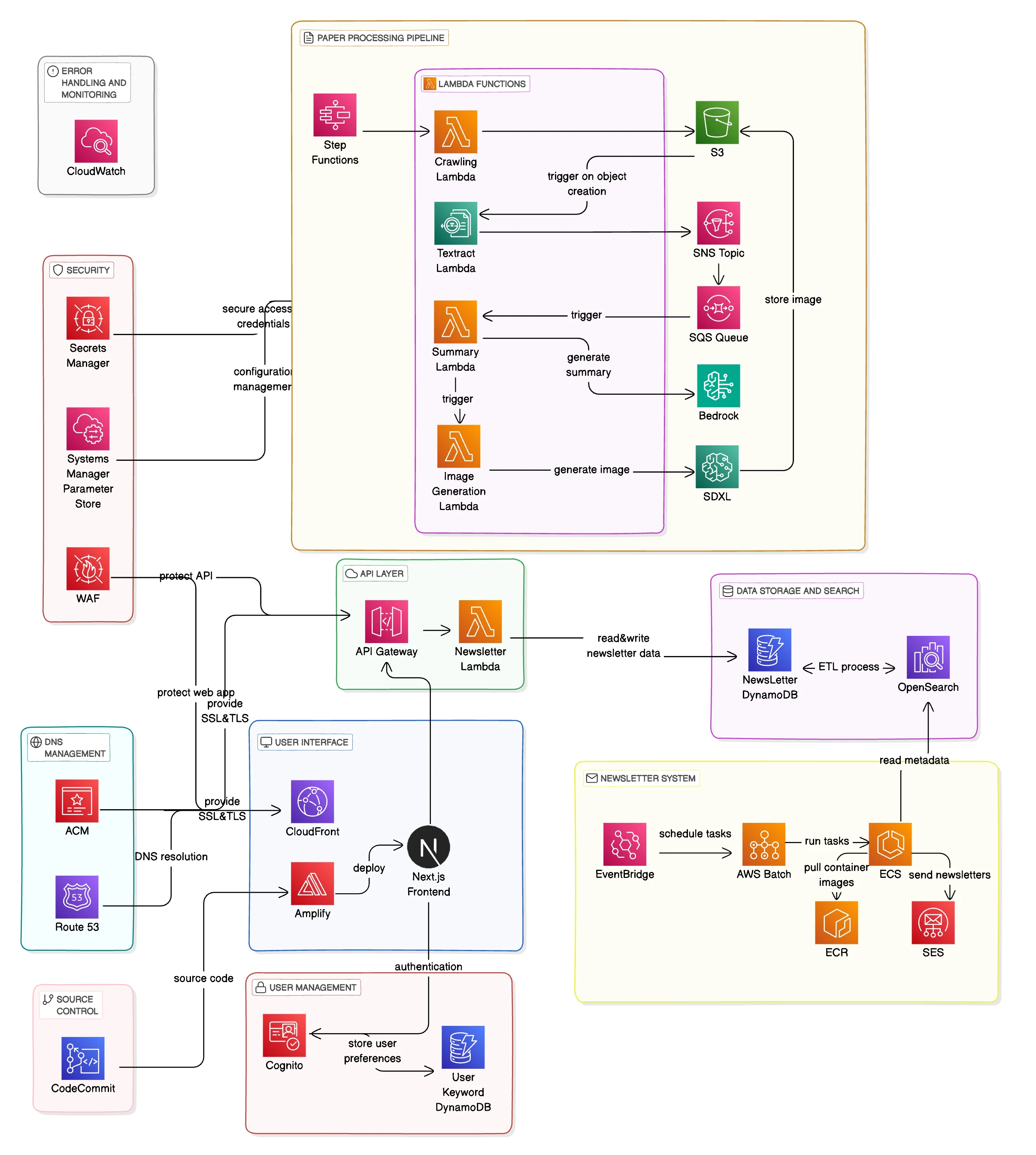
The main components are as follows:
- Crawling Pipeline
- Text Extraction & Summary Pipeline
- Search & Subscription System
- Notification System
We chose a serverless architecture to focus on implementing features during the short three-week project period. We also considered container-based architectures, but serverless was a better fit for the following reasons:
- Rapid prototyping: Start developing features immediately without setting up infrastructure.
- Minimize operational complexity: Focus on business logic without the burden of infrastructure management.
- Cost-effectiveness: Predictable cost structure at the MVP stage.
Implementing key features
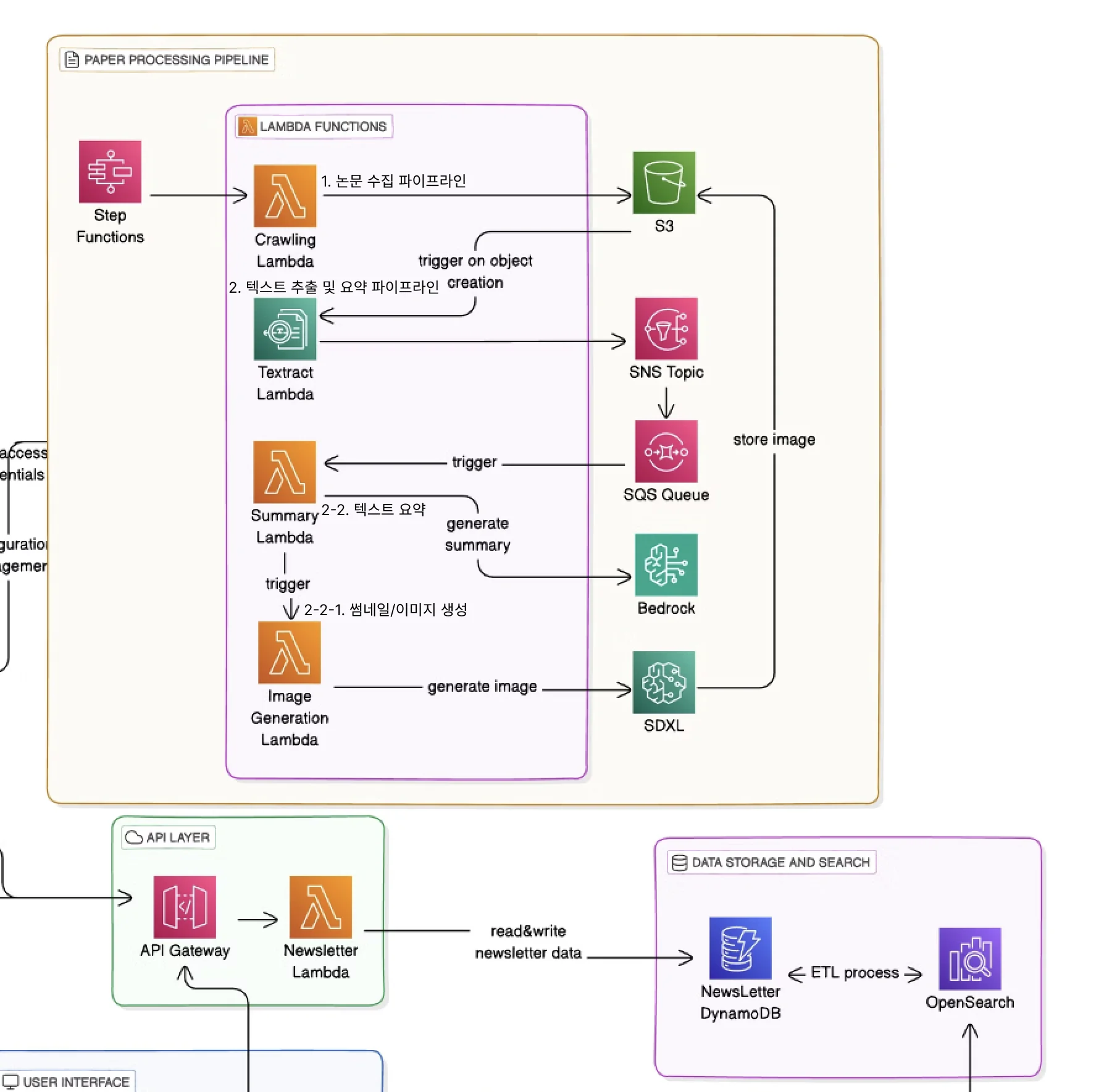
1. Paper collection pipeline
The paper collection pipeline was implemented by packaging the Chrome headless browser as a Lambda layer. Considering the limitations of Lambda's temporary storage (/tmp), we designed the collected PDFs to be uploaded to S3 immediately.
2. Text Extraction and Summarization Pipeline
Text extraction and summarization are core functions of the entire service. We initially explored several approaches, but found that the combination of Amazon Textract and Bedrock was the most effective. 특히 다음과 같은 장단점을 고려했습니다:
- Why Choose Textract
- Accurate text extraction even from two-column layout papers
- Capable of handling complex elements such as tables and graphs
- Stable operation with managed services
- Background on Bedrock
- Support for multilingual summarization (English paper → Korean summary)
- Structured Output Format (JSON)
- Keyword extraction based on context understanding
Related: After completing the Textract task, we will use Amazon Bedrock to summarize the text, extract keywords, and generate related images. Textract specializes in accurately extracting text from documents, while Bedrock's LLM excels at semantic analysis and summarization of the extracted text.
Bedrock versus Texttract for document text/meaning extraction | AWS re:Post
Extract PDF Text - Using Textract
Initially, we considered using open source libraries such as PyPDF2 or pdf2image. However, it was difficult to accurately handle complex elements such as two-column layouts, graphs, and tables unique to academic papers. Here are the main reasons why I chose Amazon Textract:
- Accurate text recognition based on OCR
- Ability to handle complex layouts
- Reliability as a managed service
However, there were a few things to consider when using Textract:
response = textract.start_document_text_detection(
    DocumentLocation={'S3Object': {'Bucket': bucket, 'Name': key}},
    NotificationChannel={
        'SNSTopicArn': sns_topic_arn,
        'RoleArn': sns_role_arn,
    }
)
Because Textract uses an asynchronous workflow, event-based processing using SNS and SQS was required. I implemented by sending a signal to the next step via SNS when the task is completed.
Text Summarization - Using Bedrock Claude
For text summarization, we used Bedrock's Claude model. To ensure consistency and quality of the summary, we used the following prompt template:
def get_prompt_template(extracted_text):
    prompt = f"""
    Please summarize the following in Korean in the form of a technology newsletter:

    Original text:
    {extracted_text}

    The response must follow the following JSON format exactly:
    {{
        "title": "제목",
        "summary": "4-5문장 요약",
        "key_findings": ["주요 포인트들"],
        "keywords": ["키워드들"],
        "sdxl_prompt": "이미지 생성 프롬프트"
    }}
    """
    return prompt
Areas for improvement
Areas of improvement in the current pipeline include:
- Handling token limits: Long papers may hit Claude's token limit. This may require section-by-section splitting or prioritizing important sections.
- Cost Optimization: As your Textract and Bedrock usage increases, so do your costs. You may want to consider introducing caching or batch processing.
- Error Handling: Extraction quality can vary depending on the PDF format or quality, requiring more robust error handling and quality verification.
3) Search and Subscription System
Search and subscription features are key features that enable users to easily find articles of interest and increase user retention. For this purpose, we chose a combination of DynamoDB and OpenSearch Service.
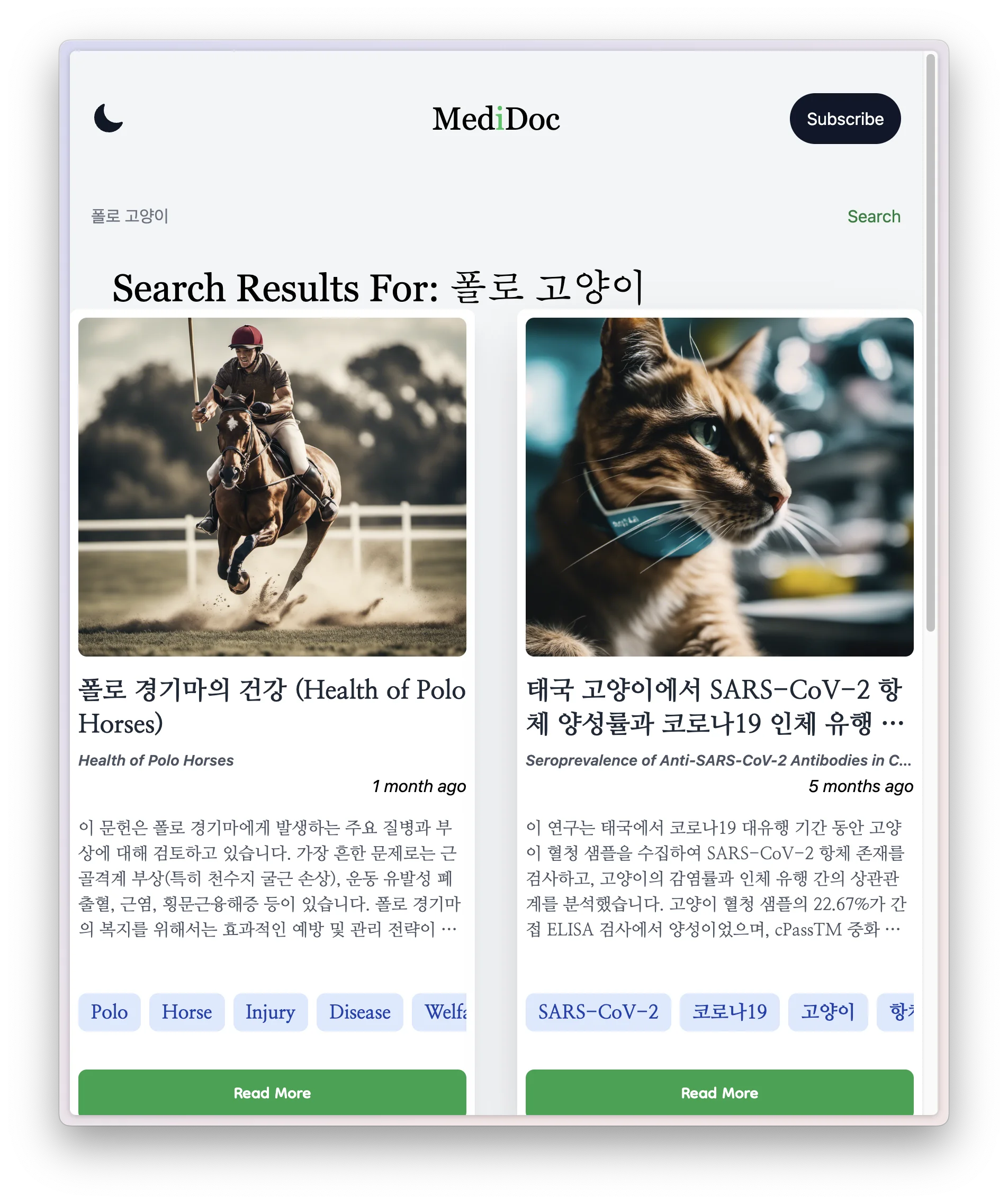
Search system implementation
Initially, we implemented search using only DynamoDB's basic query functionality, but there were limitations in full-text search and similarity-based search. To address this, we introduced the OpenSearch Service and, in particular, leveraged the recently released Zero-ETL integration with DynamoDB .
- Through the introduction of OpenSearch
- Professional search support
- Similarity-based search
- Korean morphological analysis
- By utilizing Zero-ETL integration
- Real-time data synchronization
- Reduced operational complexity
- Improved cost efficiency
We were able to obtain the same benefits.
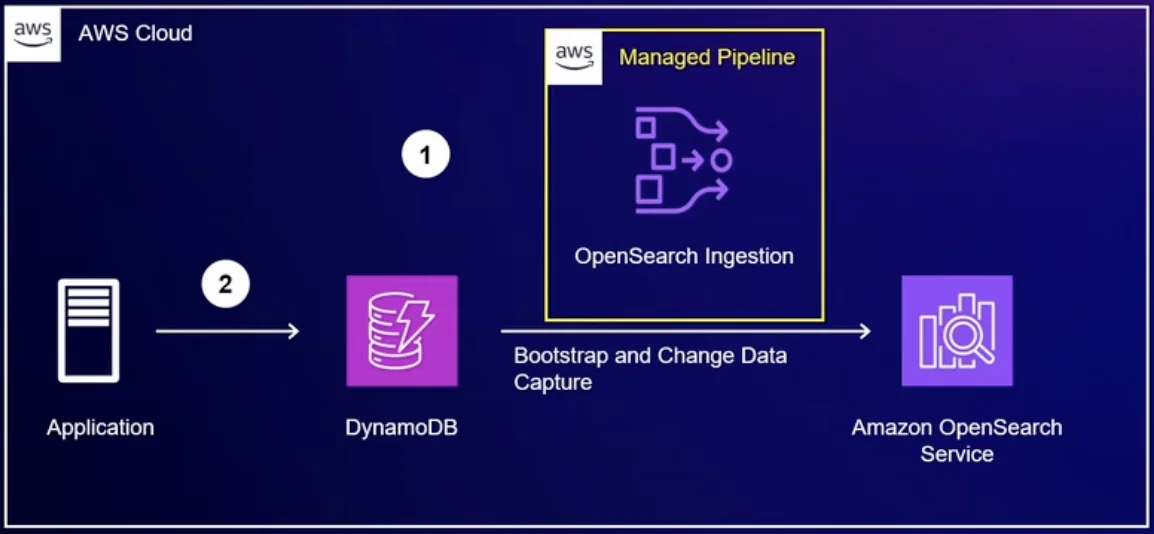
Related video: AWS re:Invent 2023 - Amazon DynamoDB zero-ETL integration with Amazon OpenSearch Service (DAT339) - YouTube |
OpenSearch query search logic:
search_query = {
    "query": {
        "bool": {
            "should": [
                { "wildcard": { "title": f"*{query}*" }},
                { "wildcard": { "summary": f"*{query}*" }},
                { "wildcard": { "keywords": f"*{query}*" }},
                { "wildcard": { "key_findings": f"*{query}*" }}
            ]
        }
    },
    "from": from_index,
    "size": size
}
The advantages of this implementation are:
- Real-time data synchronization: Automatically synchronize data from DynamoDB to OpenSearch without a separate ETL pipeline.
- Powerful search capabilities: Leverage OpenSearch's features, including morphological analysis and similarity search.
- Reduced operational burden: No need to manage ETL pipelines or deal with synchronization issues.
Implementing a subscription system
The subscription system provides an API that allows users to register and manage keywords of interest. Use DynamoDB to store your users' subscription information and expose RESTful endpoints through API Gateway.
def lambda_handler(event, context):
    method = event['httpMethod']
    path = event['path']

    # View all subscriptions for the user
    if method == 'GET' and path.startswith('/subscriptions/'):
        email = event['pathParameters']['email']
        return get_subscriptions(email)

    # Add new subscription
    elif method == 'POST' and path == '/subscriptions':
        body = json.loads(event['body'])
        email = body['email']
        keyword = body['keyword']
        return add_subscription(email, keyword)

    # Delete a specific subscription
    elif method == 'DELETE' and path.startswith('/subscriptions/'):
        parts = path.split('/')
        email = parts[2]
        keyword = parts[3]
        return delete_subscription(email, keyword)
Subscription information is stored in DynamoDB and integrates with Cognito to handle user authentication.
def add_subscription(email, keyword):
    try:
        user_sub = get_user_sub(email)
        if user_sub:
            table = dynamodb.Table(table_name)
            item = {
                'email': email,
                'keyword': keyword
            }
            table.put_item(Item=item)

            return {
                'statusCode': 201,
                'body': json.dumps('Subscription added successfully')
            }
        else:
            return {
                'statusCode': 400,
                'body': json.dumps({'message': 'User not found'})
            }
    except Exception as e:
        return {
            'statusCode': 500,
            'body': json.dumps({'error_message': str(e)})
}
Currently, we only perform simple keyword matching, but we have had the following milestones:
- Regular newsletter feature: Collects and sends papers on your area of interest on a weekly/monthly basis.
- Personalized recommendations: Tailored recommendations based on your browsing history and keywords.
- Adjustable notification frequency: Users can receive notifications at their preferred frequency.
Performance optimization
We've applied the following optimizations to improve search performance:
- Result Caching: Caching results for frequently searched keywords in ElastiCache.
- Pagination: Implementing infinite scroll-style pagination
- Index Optimization: Building Indexes for Frequently Searched Fields
def get_newsletters(query_params):
    limit = int(query_params.get('limit', 10))
    last_key = query_params.get('last_key')

    scan_params = {
        'Limit': limit,
        'ExclusiveStartKey': last_key if last_key else None
    }
Current limitations and future improvements
- Search Accuracy: Currently we are using simple wildcard search, more sophisticated search logic is needed. For example, you might consider using a medical term thesaurus to find synonyms.
- Performance Issue: There is an issue with slow response times when there are many search results. Search results caching and index optimization are required.
- Subscription System Expansion: Currently, we only support simple keyword matching, but we may consider introducing an ML-based content recommendation system in the future.
4. Notification sending system
The notification system is a function that notifies subscribers of new papers related to keywords of interest. In the MVP stage, we implemented basic email notification functionality.
Current implementation status
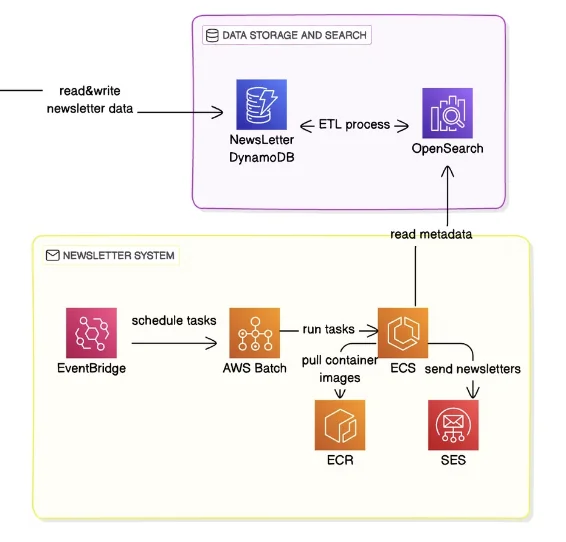
The notification system is implemented as a chain of events starting with DynamoDB Streams:
def lambda_handler(event, context):
    for record in event['Records']:
        if record['eventName'] == 'INSERT':
            new_item = record['dynamodb']['NewImage']

            # Subscriber keyword matching and notification processing
            process_notification(new_item)
The event flow is as follows:
DynamoDB Stream → Lambda → SQS → Lambda → SES
- New paper registration → DynamoDB Stream generated
- Lambda trigger → subscriber keyword matching
- SQS message queuing → notification sending Lambda
- Sending Emails with Amazon SES
def lambda_handler(event, context):
ses = boto3.client('ses')
for record in event['Records']:
body = json.loads(record['body'])
email = body['email']
keyword = body['keyword']
newsletter_info = body['newsletter_info']
# Send email
ses.send_email(
Destination={'ToAddresses': [email]},
Message={
'Subject': {'Data': '새로운 뉴스레터 알림'},
'Body': {
'Html': {
'Data': f"""
<h1>You have a new newsletter containing the keyword '{keyword}'.</h1>
<p>Title: {newsletter_info['title']}</p>
<p>Publication Date: {newsletter_info['publication_date']}</p>
<img src="{newsletter_info['thumbnail_url']}" alt="썸네일">
<a href="https://your-website.com/newsletter/{newsletter_info['uuid']}">View Newsletter</a>
"""
}
}
}
)
While this architecture works well for basic notification delivery, it does reveal some predictable limitations.
Current limitations
- Simplicity of notification handling
- All notifications are treated with the same priority.
- Notification settings cannot be customized per user
- Single point of failure exists
- Scalability Issues
- Difficulty adding notification types
- Potential bottlenecks when sending mass notifications
- Operational difficulties
- Limitations on monitoring notification delivery status
- Lack of a mechanism to reprocess failed notifications
Here we will focus on improving the architecture.
Improvement plan for notification sending system
If you want to improve from a simple event chain to a more robust architecture, you might consider the following structure:
DynamoDB Stream → EventBridge → SNS → Multiple SQS → Lambda → SES
- New paper registration → DynamoDB Stream generated
- Forward events to EventBridge → Routing based on event rules
- Forward to SNS topic → Classify by notification type
- Distribute to multiple SQS → Separate into immediate notification queue, weekly digest queue, etc.
- Custom processing for each queue in Lambda → Execution of processing logic based on notification type
- Sending Emails with Amazon SES
The main advantages of this architecture are threefold:
First, you can separate and process notifications by type. For example, notifications that require immediate delivery can be routed to the immediate notification queue, while weekly digests that collect multiple messages can be routed to a separate queue. Optimized processing for each type becomes possible .
Second, it is possible to isolate the disability. If there is a problem with processing the weekly digest, notifications will still be sent out as normal. By utilizing SQS's DLQ (Dead Letter Queue), failed messages can be collected and managed separately , thereby increasing stability.
Third, the system is easy to expand. When adding a new notification type, you just need to connect one more SQS to SNS. Each queue can independently adjust its throughput, allowing it to flexibly respond to increased loads from specific notifications .
Additional implementation details
Step Functions Introduction Review and Limitations
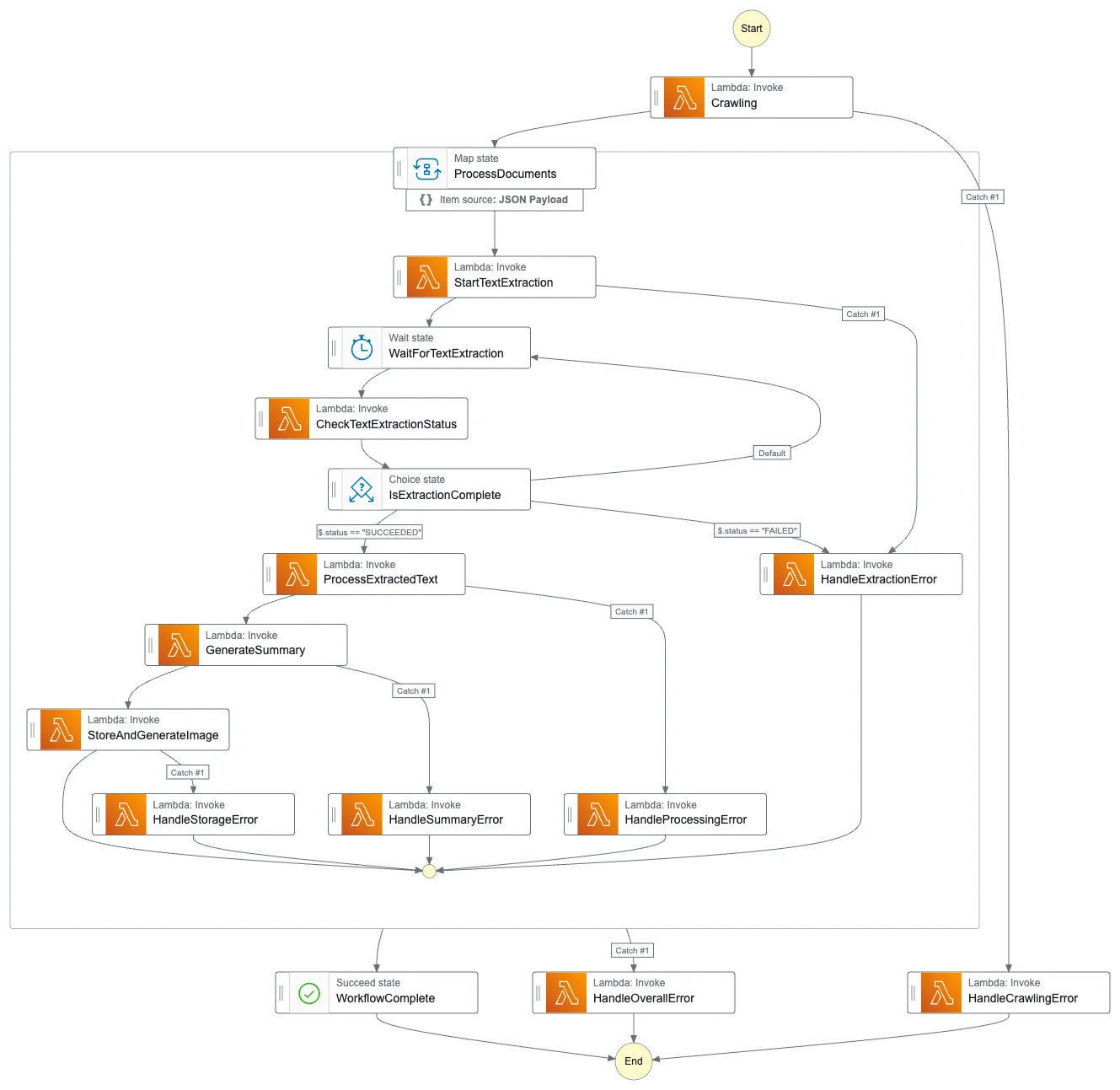
As the number of serverless components increased, we felt the need to manage the entire workflow, and for this purpose, we considered introducing Step Functions.
- Workflow Visualization
- Tracking the status of complex PDF processing pipelines
- Monitoring progress at each stage
- Quickly identify failure points
- Automated Error Handling
- Retry logic for asynchronous tasks such as Textract and Bedrock
- Handling timeout situations
- Integration with DLQ
However, during the actual implementation process, we discovered the following problems:
- Cost-effectiveness issues
- Cost per state transition in Step Functions
- Excessive operating costs expected compared to the amount of documents to be processed
- Double burden of running each Lambda function + Step Functions cost
- Increased development complexity
- Additional learning curve for defining Step Functions
- The burden of versioning state machine definitions
- Difficulties with local testing
- Limited Flexibility
- Difficulty handling exceptions outside of established workflows
- The complexity of dynamic branching
- The burden of integration with existing event-driven architectures
As a result, we opted for a simpler, event-based architecture:
- Loose coupling using SNS/SQS
- Monitoring via CloudWatch Logs
Implementing security and authentication
Security remains an important consideration even in serverless architectures. The project implemented the following security layers:
- WAF for basic web attack defense
- SQL Injection Prevention
- XSS blocking
- Detect abnormal traffic patterns
- Region-based access control
- Managing SSL/TLS Certificates with ACM
- DNS Security with Route 53
- Integrating API Gateway with Cognito
API Gateway handles authentication as follows:
const auth = {
    authorize: async function(event) {
        const token = event.headers.Authorization;
        try {
            const claims = await cognito.verifyToken(token);
            return {
                isAuthorized: true,
                context: { userId: claims.sub }
            };
        } catch (error) {
            return { isAuthorized: false };
        }
    }
};
This is a situation that needs some improvement.
If you are considering implementing Cognito,
- Fine-Grained Permission Control
- Currently, all API access is allowed to authenticated users.
- Access control based on subscription status or user role is required.
- Token Management
- Insufficient refresh token processing logic
- User experience needs to be improved when tokens expire.
I think it's important not to miss points like this.
Front-end implementation
The front-end is built on Next.js and TypeScript, with a focus on efficient integration with AWS services. In particular, the configuration using AWS Amplify was very effective for rapid prototyping and deployment.
Operations and Monitoring - Future Improvements
Only basic CloudWatch monitoring is implemented. To ensure stable service operation, the following factors should be considered:
- Comprehensive monitoring system
- Establishing an Error Reporting System
- API Performance Monitoring
- Notification System
- Set key indicator threshold alerts
- Automated daily/weekly reports
- Logging Strategy
- Defining a structured log format
- Processing policy by log level
Cost Management - What Needs Improvement
At the MVP stage, we focused on implementing features rather than cost optimization. Going forward, we believe the following cost management strategies will be necessary:
- Cost Analysis by Service
- Optimizing Lambda function execution time and memory
- Adjusting DynamoDB's Read/Write Capacity
- S3 storage tiering
- Caching Strategy
- API response caching
- Memory caching of frequently accessed data
- Leveraging CDN for static resources
- Resource Management
- Automatic cleanup of unused resources
- Test environment resource management
- Backup Data Retention Policy
In conclusion
This project allowed me to utilize various AWS serverless services in an actual production environment. In particular, we have experienced that technologies such as Step Functions, SNS/SQS combination, and Zero-ETL integration are very effective in building actual services.
I hope this article will help you design a serverless architecture using AWS. If you have any further details or questions, please leave a comment.