<Claude All-in-One> Not How to Prompt Better, but Where to Send the Work

This review was written as part of the <I Am a Reviewer> (나는리뷰어다) program run by Hanbit Media (한빛미디어), which provided the book.
Why I Picked This Book
I use Claude Code every day. Keeping it open in a terminal and throwing refactors or test writing at it is routine. But almost everything else my Claude account can do, I've barely touched. I'd never opened the Cowork tab, I backed out of the connector list at the permissions screen, and I didn't even know the Design tab existed.
The problem wasn't that I didn't know the features. When I wanted a meeting summary, I picked by gut every time: paste it into chat, create a project and gather the material there, or hand the whole folder to Code. And after picking, I was never sure it was the right call. The more tools there are, the more decisions there are to make, and I'd been adding tools without adding any basis for deciding.
The book's subtitle is "with Cowork, Code, Design," but what the author stresses in the introduction isn't a feature list. It's exactly that basis for deciding. That's the part I was curious about, so I picked it up.
Who Should Read This
- You've only used Claude as a chatbot and want to sort out Cowork, Design, connectors, and scheduled runs all at once
- You want to cut repetitive work but don't know where to draw the line on automation
- You're a developer who has to explain AI tools to non-developer teammates
On the flip side, if you're expecting a book that digs into code or APIs, this isn't it. In the introduction the author states flatly that "the reader of this book is not a developer." It doesn't make you memorize terminal commands or syntax. It keeps coming back to what to delegate and where to stop and check. If you already use Claude Code, you can skim through Parts 1 and 2.
What It's Like
It's a Classification Table, Not a Feature Manual
My first impression was, "this isn't a manual, it's a taxonomy." Part 1 doesn't open a single feature. It just keeps asking: is this a job that ends in chat, a job that needs material gathered into a project, or a job that touches folders?
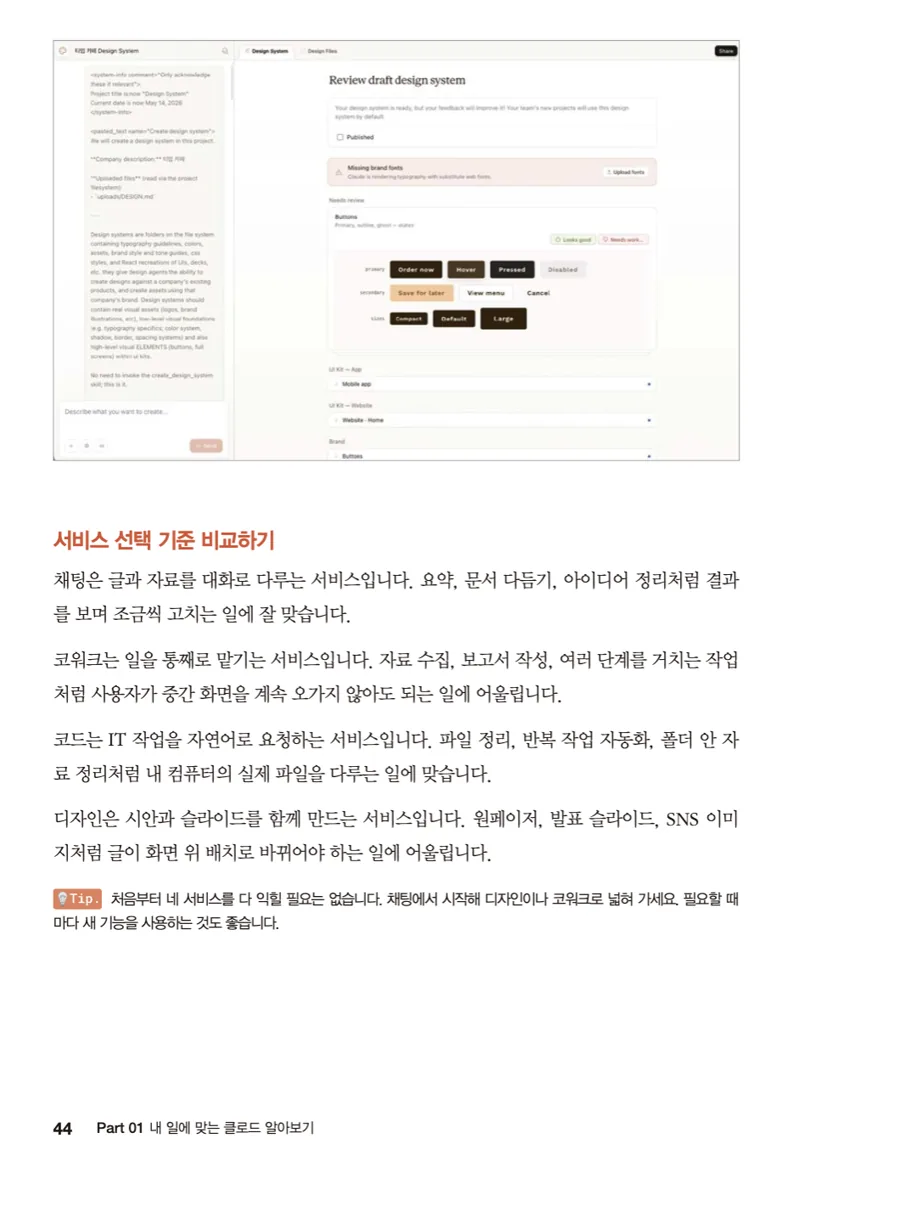
The four paragraphs on page 44 are the axis of the entire book. Chat is for work where you watch the output and adjust it bit by bit. Cowork is for work where you don't need to see the intermediate screens. Code is for work on actual files on your own machine. Design is for work where text has to turn into a screen layout. After reading it, I realized most of the tasks I'd been dumping into the Code tab and getting frustrated with were things that should have ended in chat.
What matters is not where the buttons are, but the criteria for dividing up the work. (Introduction, p. 7)
That sentence is the design intent of the whole book. As a result, the parts that stay useful after the UI changes and the parts that go stale quickly are clearly separated.
The Most Valuable Parts for a Developer Are Late Chapter 7 and Chapter 13
What I actually spent the longest on wasn't the hands-on sections but two Special sections.
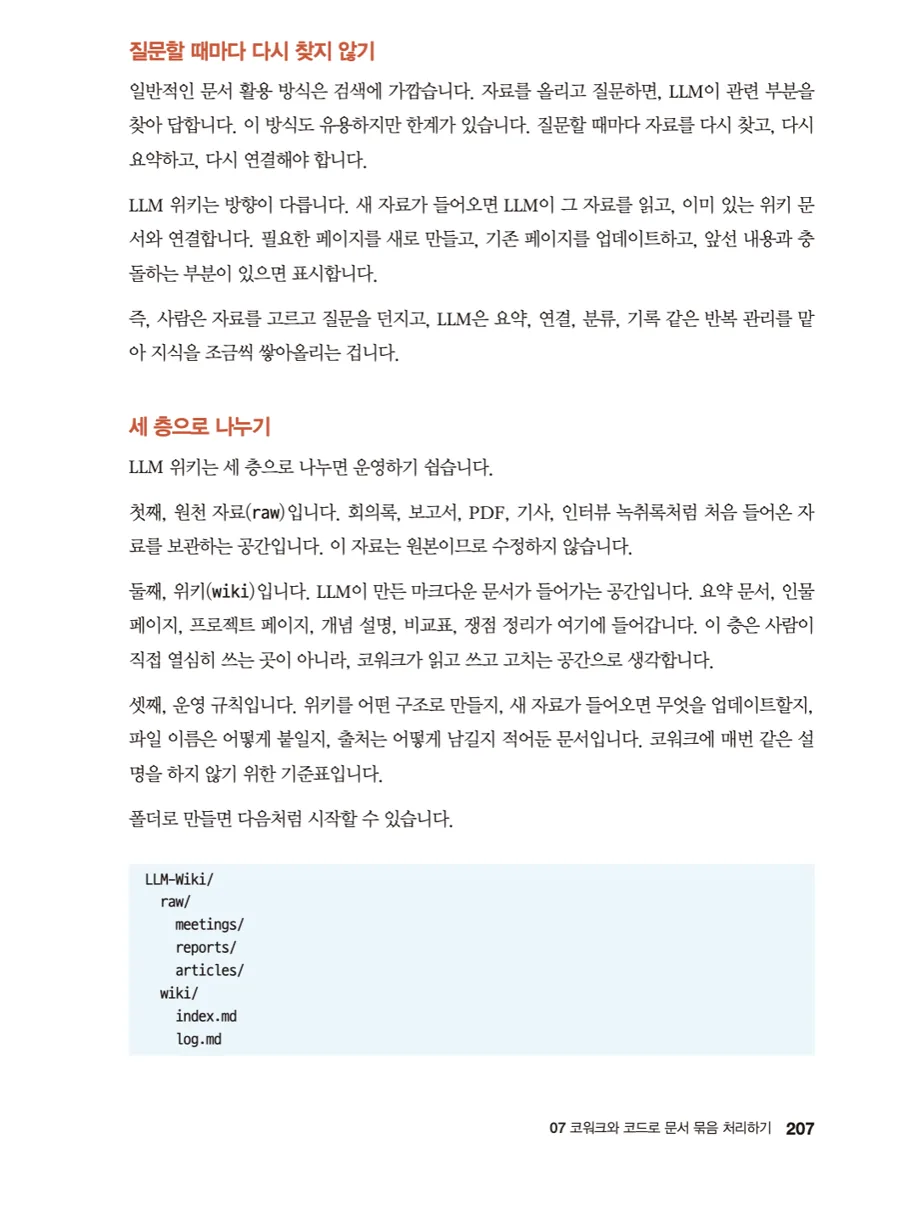
One is the LLM wiki in section 7.10. Uploading material and re-asking whenever you need something is closer to search, and it makes you re-summarize from scratch every time. Instead, if you link new material to the existing documents as it arrives and flag the parts that conflict, you no longer have to go hunting again with every question. The structure splits the folder into three layers, raw source material, the wiki the LLM reads, and operating rules, with index.md and log.md holding the index and the history. To a developer's eye it just reads as README conventions and a CHANGELOG moved into a knowledge store. Because the pattern was familiar, I built one right away.
The SKILL.md design in Chapter 13 was good for a similar reason. Write the skill description as an invocation condition, not a feature brag. And for beginners, writing the prohibitions before the processing rules is the safer order (p. 355). Not abstract sentences like "be careful," but checkable ones: don't invent numbers that aren't in the source, leave a blank when there's no name. This is really the same thing we ask for in code review: break the spec into verifiable units.
Details that only someone who has actually built one would know are scattered throughout, like the note (p. 355) that keeping name and description in English makes invocation matching more reliable, while the body instructions can stay in Korean.
The Security Part Isn't Boilerplate
Chapter 14 was the surprise. When you receive an external skill as a ZIP and the folder structure is in order but scripts/install.sh sits in there with no explanation, the verdict isn't "safe to upload" but "fix and test," and the reason given is not that the skill is bad but that the installer script's role was never explained (p. 376). There's also a cross-check method: README is a document for humans and SKILL.md is an instruction for Claude, so if the two disagree, that mismatch is itself a warning sign.
The review technique of collecting the action verbs (reads, stores, modifies, sends) separately instead of reading the feature description makes sense from a supply chain review standpoint too. It's rare for a book about using AI to cover pre-install verification at this density.
Chapter 20, Which Keeps the Tool You Built in Use
Part 5 walks through building small work tools by vibe coding, but the chapter that stuck with me wasn't Chapter 19, where you build the tool, but Chapter 20, where you attach it.
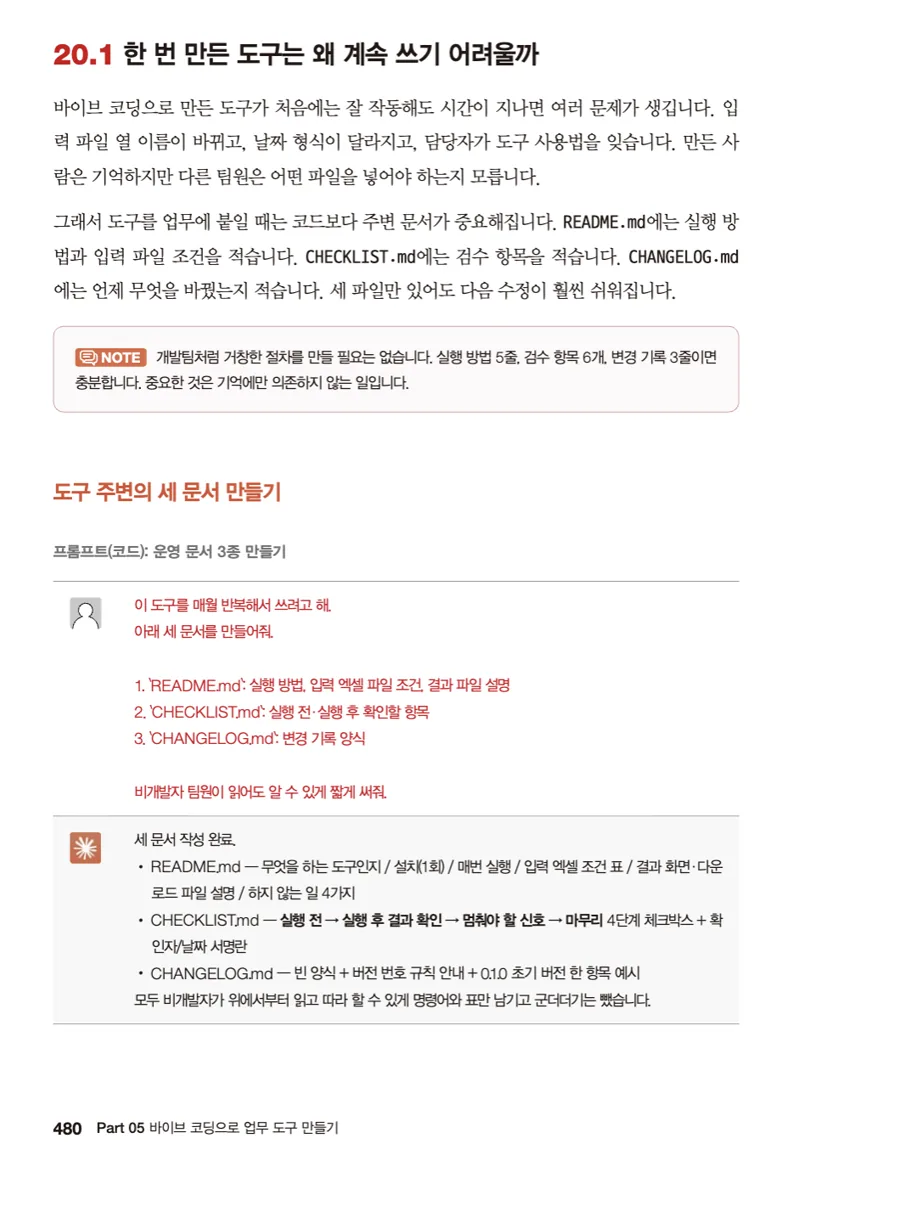
It treats a tool falling out of use as a missing-documentation problem, not a code problem. How to run it and what inputs it needs go in the README, the review items go in the CHECKLIST, and the changes go in the CHANGELOG. And it draws a line: you don't need to do this as elaborately as a dev team, five lines on how to run it, six review items, and three lines of change history are enough. If you've ever dropped a script on your coworkers with "here, use this" and watched nobody use it, this section will sting the most.
Chapter 21 strings one flow together: pull sales data from a web board as CSV, turn it into an HTML dashboard, polish it with Claude Design, and review the numbers and any personal information before sending it out. It's a capstone exercise that uses everything from the preceding 20 chapters, so its placement at the very end makes sense.
What Falls Short
Screenshots have a shelf life. The author says up front that everything is as of June 2026, but Claude keeps changing in the meantime. The line in the opening about rewriting this book only ten weeks after the previous one is itself the proof. Statements like computer use being a Pro/Max research preview, or Claude in Chrome being Chrome-only, will need rechecking six months from now. This is a book where the decision criteria last and the UI descriptions age fast, so the latter are better read as a snapshot from the start.
The opening is slow for developers. That's a fair trade-off for a book aimed at non-developers. If you're using Claude Code, a good chunk of Parts 1 and 2 is already familiar, and the density jumps sharply in late Chapter 7, Chapters 13 and 14, and Chapter 20. Rather than reading in order, it's more efficient to pull the Special sections and the skills and verification parts out of the table of contents and read those first.
The exercises lean on the sample data. Section 21.8 ends with "try it with your own data," but the problems that appear the moment you switch to your own data (mismatched column names, encoding, date formats) are mostly left to the reader. The CHECKLIST idea in Chapter 20 fills part of that gap, but I would have liked at least one more chapter of failure cases.
Structure
It opens with endorsements, an introduction, and a "before you start" section on installation and login, runs through 5 parts and 21 chapters, and closes with an afterword and a further reading section. At 540 pages, it's a substantial book.
- Part 1, Finding the Claude That Fits Your Work (Chapters 1-3): distinguishes when to use chat, Cowork, Code, and Design, then settles privacy and training settings and how much company material you'll allow before sending the first request. It goes as far as criteria for switching tabs based on the size of the task.
- Part 2, Polishing Documents and Material (Chapters 4-7): the main event, covering drafts, announcements, email, meeting notes, PDFs, and tabular data. How to gather material and instructions into a project, how to split the output off into artifacts, how to sort sources into primary and secondary and separate fact from inference. The LLM wiki is tacked on at the end of Chapter 7.
- Part 3, Getting to Know Claude Design (Chapters 8-10): starts from a single-card mockup and works up to slides, card news, posters, and infographics. It stands out for treating Korean line breaking, accessibility, and per-aspect-ratio review as separate topics. How to record tone and rules in
DESIGN.mdand carry them into the next job is at the end of Chapter 10. - Part 4, Cutting Repetitive Work with Skills and Connectors (Chapters 11-16): the difference between plugins, skills, and connectors, checking the permissions screen before installing, writing
SKILL.mdand designing commands like/weekly-review, vetting external skills, connecting Gmail, Calendar, and Drive, and scheduled runs. This is the thickest part of the book. - Part 5, Building Work Tools with Vibe Coding (Chapters 17-21): start browser and file work in read-only mode, write the request document first, build a small tool, attach it to your routine with three documents, and tie it all together at the end with a sales dashboard.
Final Thoughts
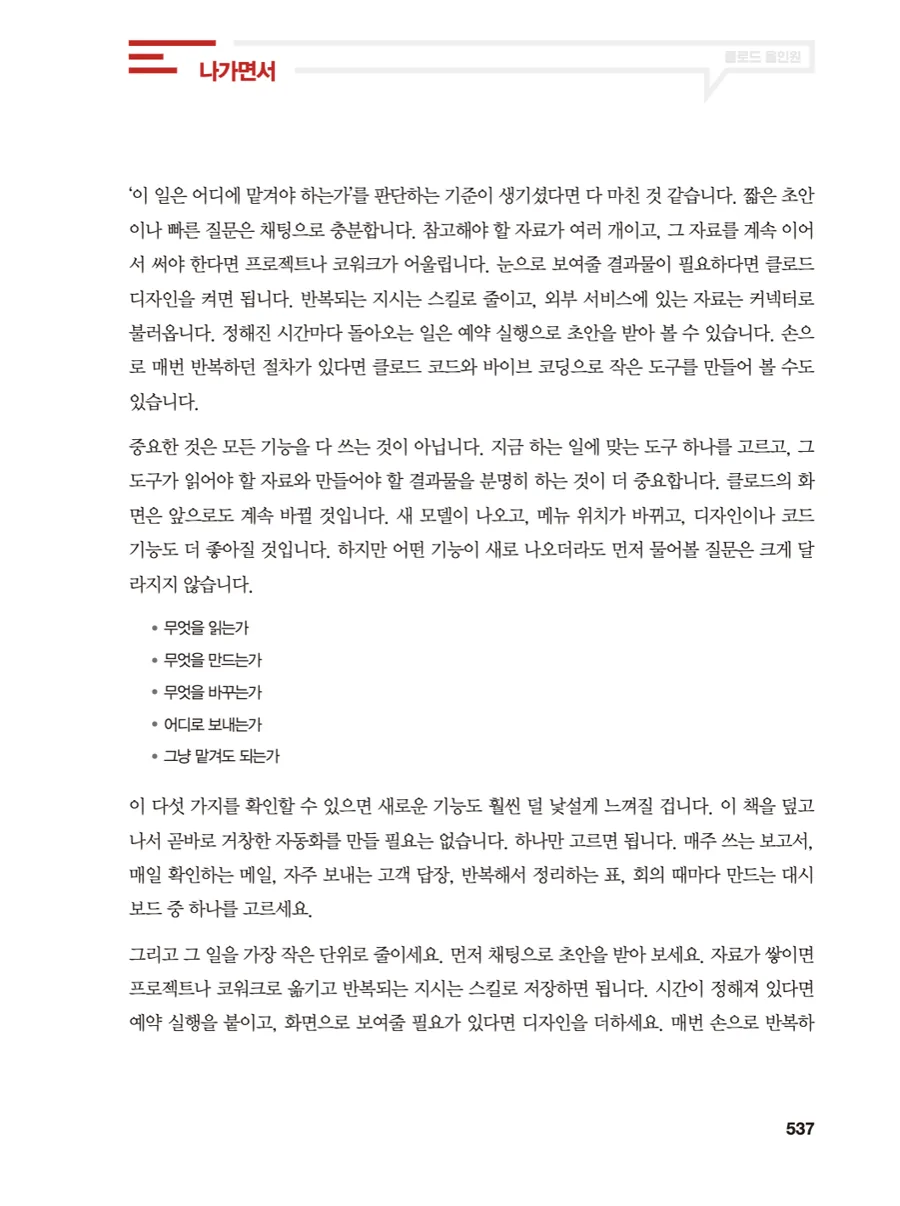
The afterword condenses the book's conclusion into five lines. It says the first questions to ask don't change much when a new feature arrives: what does it read, what does it create, what does it modify, where does it send things, and is it fine to just let it run. Once those five become second nature, a changed screen feels less unfamiliar.
Two things actually changed after I read it. One, I split the folder holding our internal documents into raw source material and a curated wiki, and added an index file. Two, when I move a frequently used instruction into a skill, I now write the prohibitions before the processing order. Neither is a concept I learned here for the first time. Any developer is already doing this with READMEs and lint rules. What I did meet for the first time in this book is the idea of applying it outside the code repository, to meeting notes, reports, and slides.
It's a book of more than 500 pages, but what it asks of you is small. Don't set up a grand automation project. Pick one thing, the report you write every week or the email you check every day, and cut it down to the smallest unit. In a period when tools keep multiplying, a book about deciding where a piece of work should go seems likelier to last than one telling you to learn more features.
#한빛미디어 #나는리뷰어다 #클로드올인원